
Before the event
Create games, organize rounds and patterns, prepare player options, build paper packets, get room screens ready, and organize event music when Music Manager is configured.
Everything you need to run bingo night
Plan the rounds before the event, run the live game from one Host Control Center, keep TVs and projectors in sync, manage helpers and claims, and support both paper and digital cards. Ready For Bingo also gives the host room-audio controls and, when configured, a Music Manager for event playlists.
Built for community bingo, fundraisers, clubs, venues, and private events.
Ready For Bingo does not force everyone into the same screen. Each person sees the tools that match the job they are doing.
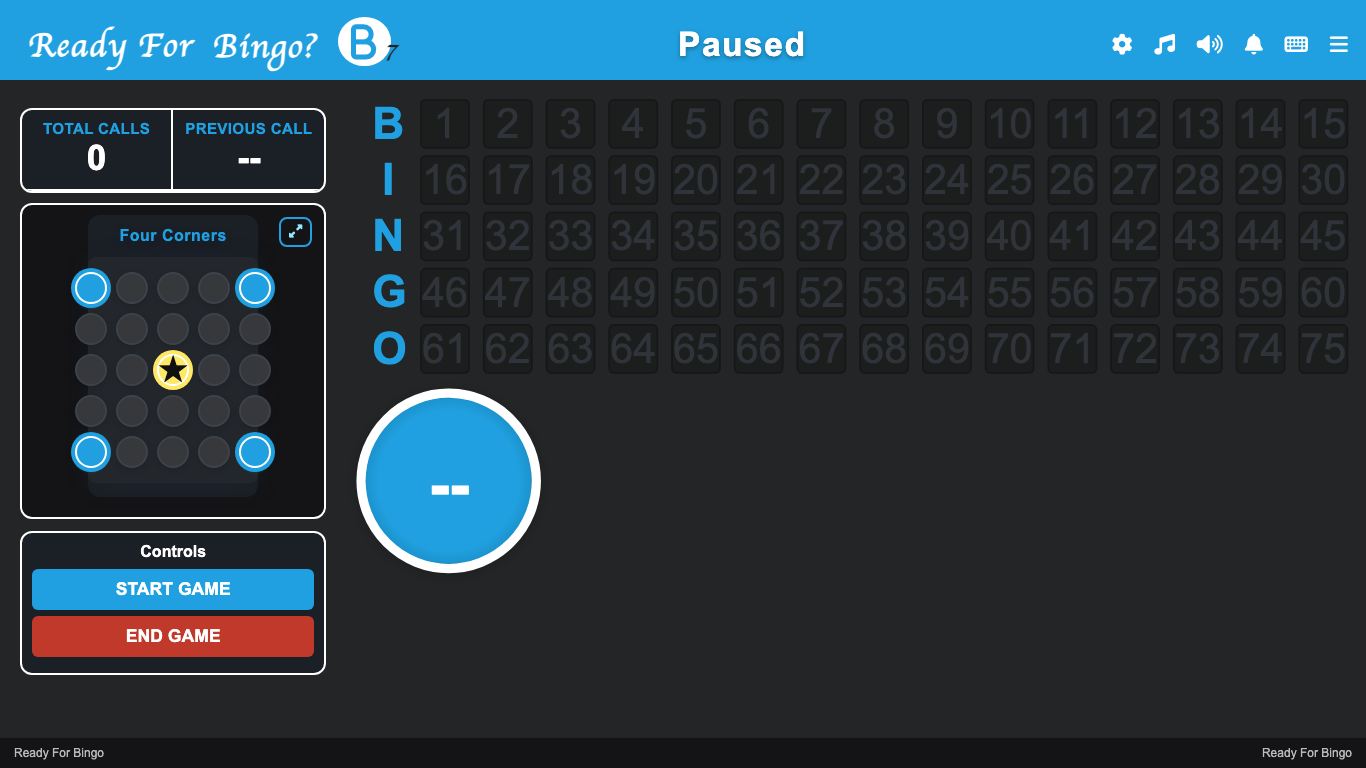
The Host Control Center is the operator workspace for rounds, patterns, number calling, claims, connected screens, and live activity.
A clean public callboard keeps the current ball, pattern, called numbers, and game status visible across the room.
Staff can use focused phone or tablet tools for claims, paper checks, and player support without taking over the host screen.
Players can use printed packets or join with a game code for digital cards. No player account is required to join.
Host access is for the people running the event. It covers the management side of Ready For Bingo before doors open, while the game is live, and after the last round. Players join separately and do not need a host account.
Create games, organize rounds and patterns, prepare player options, build paper packets, get room screens ready, and organize event music when Music Manager is configured.
Choose manual or automatic calling, call and undo numbers, pause play, move through rounds, monitor claims, coordinate helpers, control venue audio, and keep room displays updated.
Keep event history, replay information, cash-only records, and authorized exports together for your organization's records.
A Ready For Bingo night follows the same order your team already works in. The software keeps those steps connected.
Create the event, build the round order, choose the patterns, set the game options, and prepare printed packets if you are using them.
Open the public callboard on the projector or TV, connect and identify hall screens, prepare helper or table devices, check room audio, and show players the game code when digital cards are available.
Use the Host Control Center to choose manual or automatic calling, call or undo numbers, pause when needed, move through rounds, monitor claims, control room audio, and keep connected screens in sync.
Review the claim against the active pattern and called numbers, complete the host's real-world winner check, record the result, and keep the event history for later.
Ready For Bingo connects the parts of bingo night that usually live in separate tools. Set up the game, run the calls, keep the room informed, manage connected screens and audio, help staff verify wins, and keep the event record together.
Run the live game from one operator screen with game information, round and pattern controls, calling controls, claims, connected screens, and activity in view.
Put a clean, projector-ready callboard on TVs and projectors, then monitor and identify connected hall screens from the host workspace.
Control supported hall-display audio from the host workspace, use the host microphone when needed, and organize event playlists through Music Manager when your music library is configured.
Use printed packets, digital player cards, or both. Players can join digital games with a code, while paper packets stay tied to stored card grids and unique serials.
Give helpers a focused phone or tablet view for claim work and paper checks without giving them the full host control screen.
Keep the event history, replay data, cash-only records, and authorized exports together so the night does not disappear when the last round ends.
The public callboard is separate from the host controls. Put it on a projector, TV, or other room display so players see the current ball, called numbers, recent calls, active pattern, and game status without seeing the operator workspace.
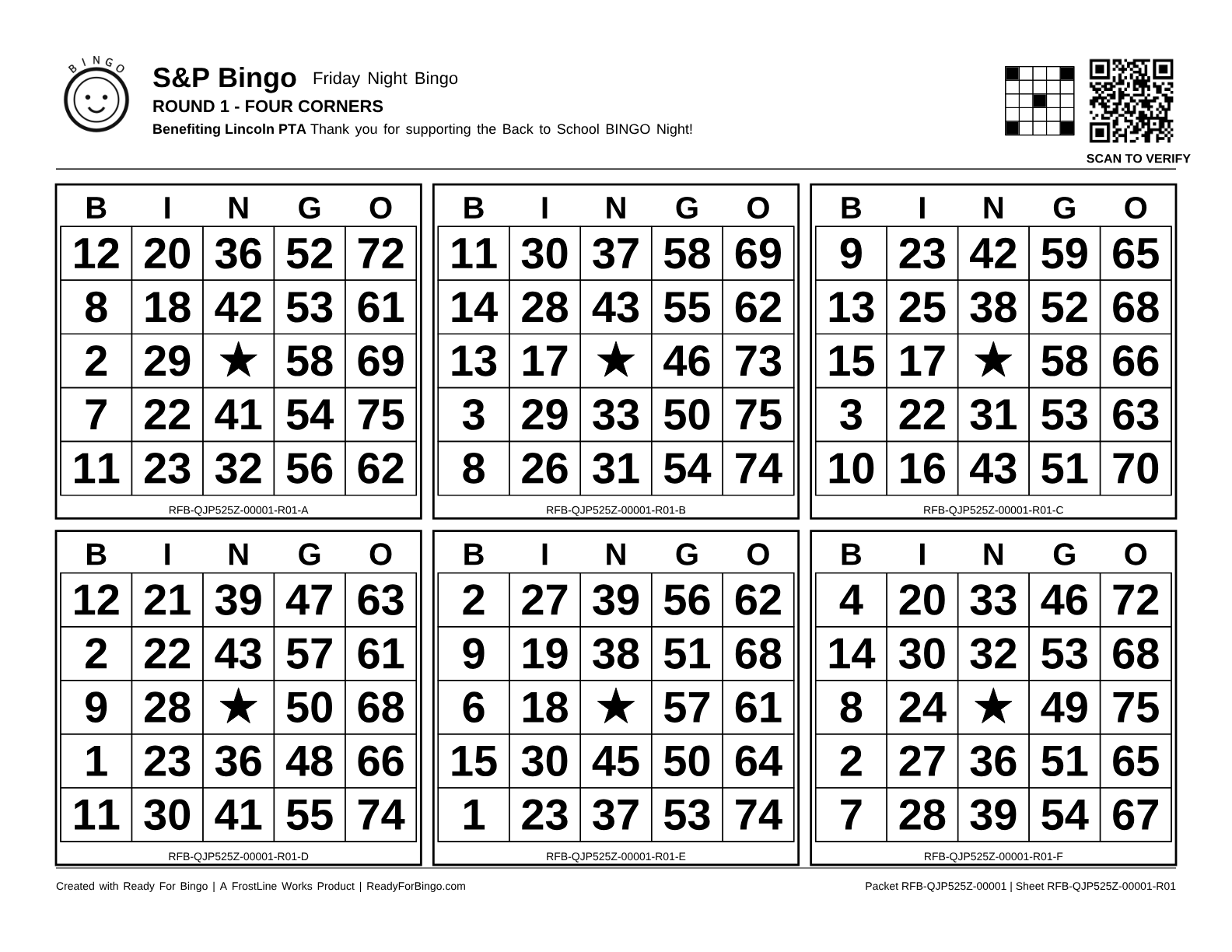
Create US Letter landscape packets with six bingo faces per round. Each sheet keeps its stored card grids and unique serial so your team can identify it later, reprint reliably, and check paper wins against the live game.
Choose the event and rounds, then add the public name and branding your players should see.
Generate approved production PDFs with visible packet and sheet serials. Keep the stored card definitions attached to those serials.
Helpers can use the sheet identifier to find the paper card and compare it with the current pattern and called numbers.
Digital cards do not play themselves. Players mark and unmark their own cards, just like paper bingo. Ready For Bingo can highlight the latest call and keep the card connected to the live game without taking the play away from the player.
Host access opens the event-management side of Ready For Bingo: game and round setup, the Host Control Center, room displays, helper tools, printed packet tools, registration tools, event history, and authorized exports. Optional modules can add other capabilities for organizations that use them.
At minimum, use a current desktop browser on the host computer. For an in-person room, add a projector or large TV for the public callboard. Helpers can use phones or tablets, and players can use printed packets or compatible phones for digital cards.
Yes. Ready For Bingo can run the live callboard and host workflow while players use printed packets. The packet tools create six-face landscape sheets with stored grids and unique serials so helpers can identify and check paper cards later.
Yes. Players open the join page, enter the 6-character game code, and receive cards for the current round when digital cards are being used.
No. Players mark and unmark their own cards. Ready For Bingo may highlight the latest called number, but highlighting does not mark the card.
No. A player can join a game with the event code without creating an account. Organizations that enable optional player accounts can offer the supported account features available to them.
Yes. The helper desk and remote controller are built for focused staff tasks on smaller screens, so helpers do not need the full Host Control Center.
Yes. The Host Control Center lets the host switch between manual calling and automatic calling. The host remains in control of pausing, undoing mistakes, moving through rounds, and handling claims.
Yes. Venue Audio controls supported hall displays and can distribute the host microphone with browser permission. When Music Manager is configured, hosts can choose tracks, build and order playlists, preview audio, and assign music for different parts of the event. Hosts are responsible for having the rights or permission to upload and play any music they provide.
No. Ready For Bingo provides cash-only records for host reconciliation. It does not process payments, sales, prize pools, or payouts.
Ready For Bingo is normally an online host application. A prepared local Game Brain can keep an in-person event running across the venue LAN during an internet outage. It must be prepared in advance and is not a universal offline mode.
VDO.Ninja video is optional and disabled by default. A host must enable it for a specific event before the video room is used.
No. Bingo rules, licenses, prize limits, age rules, and reporting requirements vary by location and event type. The host and organizing entity remain responsible for understanding and following the requirements that apply to the event.
Players open the Ready For Bingo join page and enter the 6-character game code shown by the host. No player account is required.
Open the host application to create a game, prepare an upcoming event, or continue one already in progress.